

Managing a growing business often becomes more complicated than expected. A small team may begin with a few simple tools: email for communication, spreadsheets for planning, messaging apps for quick updates, and a shared document for keeping important information. As the business grows, however, these tools can quickly become difficult to manage.
Tasks get lost in conversations. Deadlines are forgotten. Important documents become difficult to find. Team members may not know who is responsible for a particular task, and managers can spend more time asking for updates than actually moving projects forward.
This is where project management software can make a significant difference.
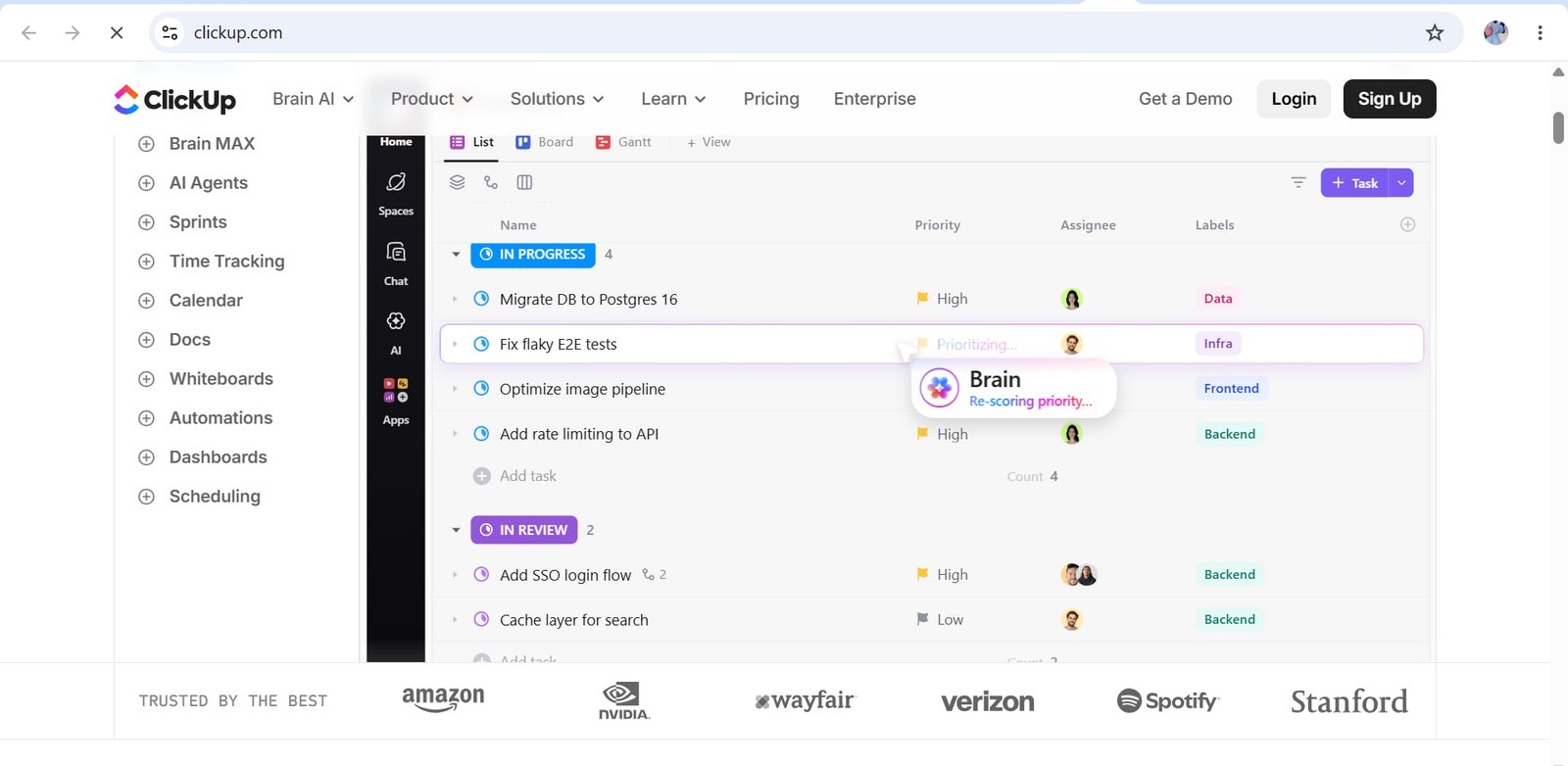
ClickUp is a work management platform designed to bring tasks, projects, documents, communication, goals, dashboards, automation, and AI-powered productivity features into one workspace. Instead of requiring teams to move constantly between different applications, ClickUp provides a centralized environment for organizing and managing work.
For businesses that are managing multiple projects or working with distributed teams, having one organized workspace can make everyday operations easier to understand and monitor.
But what exactly does ClickUp offer, and how can businesses use it effectively?
What Is ClickUp?
ClickUp is a project and work management platform that allows individuals and teams to organize their work in one place.
The platform is built around tasks and projects, but it goes beyond basic task management. Teams can use different views, documents, dashboards, goals, chat, automations, time tracking, forms, whiteboards, and other tools depending on their workflow.
According to ClickUp’s current product information, its platform brings together tasks, projects, Docs, Goals, Dashboards, Chat, Whiteboards, AI tools, and other work-management capabilities.
The idea behind this approach is relatively simple: instead of having information spread across several disconnected applications, a team can keep much of its work connected inside one system.
For example, a marketing team could create a campaign project, assign tasks to writers and designers, store the campaign brief in a document, create deadlines, track progress on a dashboard, and automate repetitive notifications.
That can reduce the amount of time employees spend searching for information.
Why Project Management Software Matters
Before looking at specific ClickUp features, it is useful to understand why project management software has become important for modern businesses.
A project usually involves several moving parts. There may be people responsible for different tasks, deadlines that depend on one another, documents that need to be reviewed, meetings that generate new action items, and customers or managers who need regular updates.
When all of this is handled manually, mistakes become easier to make.
Imagine a company launching a new website.
The designer needs the brand assets. The writer needs the product information. The developer needs the final page copy. The marketing team needs the launch date. The manager needs to know whether everything is on schedule.
Without a central system, each person may manage their part differently.
With a project management platform, these activities can be connected.
This is one of the main reasons tools such as ClickUp have become useful for businesses, agencies, startups, and remote teams.
ClickUp Tasks: The Foundation of Project Management
Tasks are at the center of ClickUp’s project management system.
A task can represent almost any actionable piece of work. It could be writing an article, designing a landing page, fixing a software issue, contacting a customer, preparing an invoice, or reviewing a marketing campaign.
ClickUp allows tasks to include information such as descriptions, assignees, due dates, priorities, custom fields, subtasks, checklists, comments, attachments, and relationships with other work.
This structure can be particularly useful when a project contains many smaller responsibilities.
For example, instead of creating one task called “Launch New Product,” a team could divide it into:
- Research competitors
- Write product description
- Create product images
- Build landing page
- Prepare email campaign
- Publish social media posts
- Test checkout process
- Review analytics
- Launch campaign
Each task can have its own owner and deadline.
This makes the project easier to follow because everyone can see what needs to happen next.
Different Ways to View Your Work
Different people prefer to organize information in different ways.
A project manager may prefer a list because it provides a straightforward overview of tasks. A marketing team may prefer a board because campaigns can be moved between stages. A manager may prefer a Gantt or timeline view to understand deadlines and dependencies.
ClickUp supports multiple ways of viewing work, including List, Board, Calendar, Gantt, and Timeline-style views.
This flexibility is useful because the underlying work does not necessarily need to change just because the way you look at it changes.
For example, a content team might use a board with columns such as:
Ideas → Research → Writing → Editing → Published
When an article moves forward, the task can be moved to the next stage.
This gives the entire team a visual understanding of the content pipeline.
ClickUp Docs for Organizing Business Knowledge
Projects are not only made up of tasks.
Teams also need documents.
These documents may include company policies, marketing strategies, campaign briefs, product specifications, meeting notes, research, content plans, and internal guides.
ClickUp Docs allows teams to create collaborative documents that can be connected directly to their work. ClickUp says Docs can be connected to tasks, projects, wikis, and other parts of the workspace, while also providing features such as real-time collaboration and version history.
This connection between documents and tasks can be valuable.
Suppose a company is developing a new product.
The product requirements can be stored in a document. Tasks can then be created for the development team, marketing team, and sales team.
Instead of searching through an email inbox to find the original requirements, employees can access the relevant information from the same workspace.
For companies with growing teams, centralized documentation can also make onboarding easier.
A new employee can potentially find important information without asking several different people where a particular document is stored.
ClickUp Automations Can Reduce Repetitive Work
Repetitive administrative work can consume a surprising amount of time.
For example, a team member may repeatedly assign tasks, change statuses, send notifications, or update information after certain events.
Automation can reduce some of this manual work.
ClickUp currently offers automation features that allow teams to create triggers, conditions, and actions. Its official automation documentation describes workflows such as changing task statuses, assigning work, sending emails, and performing other actions automatically.
ClickUp Automations
Consider a simple example.
A marketing agency might create a workflow where:
- A new client request is submitted.
- A task is automatically created.
- The task is assigned to the appropriate team member.
- A due date is added.
- The relevant person receives a notification.
- The task moves through predefined workflow stages.
Instead of someone manually handling every step, automation can take care of routine actions.
This does not mean every business process should be automated. Some decisions still require human judgment. However, removing repetitive administrative tasks can give employees more time for creative and strategic work.
ClickUp and AI
Artificial intelligence has become increasingly important in workplace software.
ClickUp has integrated AI capabilities through ClickUp Brain and newer AI-related features. ClickUp describes Brain as an AI layer that can work with information across tasks, documents, conversations, and other workspace content.
AI can be useful for several everyday activities.
A manager might need a quick summary of project progress. A writer might need help creating a first draft. A team member might want to locate information inside a large collection of documents.
AI features can help reduce the amount of manual searching and repetitive writing involved in these tasks.
However, AI should be treated as an assistant rather than a replacement for human review.
Business information can be sensitive or context-dependent, so employees should still check important summaries, recommendations, and generated content before using them in business decisions.
Dashboards for Monitoring Business Performance
A project can be progressing while management still struggles to understand the bigger picture.
This is where dashboards can help.
Dashboards provide a way to visualize information about projects, tasks, progress, and other business activities.
For example, a marketing agency might create a dashboard showing:
- Active campaigns
- Completed tasks
- Overdue tasks
- Team workload
- Campaign progress
- Client projects
- Upcoming deadlines
Instead of opening individual tasks to understand what is happening, managers can use a centralized overview.
This can be especially useful when a business has multiple projects running at the same time.
ClickUp for Marketing Teams
Marketing teams often manage many different types of work simultaneously.
A single campaign may involve research, content writing, graphic design, social media, email marketing, paid advertising, SEO, reporting, and client communication.
ClickUp can be used to organize these activities into connected workflows.
For example, an SEO team could create a content workflow:
Keyword Research → Content Brief → Writing → Editing → SEO Review → Publishing → Promotion
Each article can become a task with its own deadline and owner.
The content brief can be stored in ClickUp Docs, while the task itself can contain the publishing date, target keyword, status, and relevant links.
This structure makes it easier to manage a large content calendar.
ClickUp for Remote Teams
Remote work creates a unique challenge: employees cannot always walk over to someone’s desk and ask for an update.
That means information needs to be accessible.
A centralized work management platform can help remote teams understand what is happening without relying entirely on meetings or private messages.
ClickUp provides tools for tasks, Docs, Chat, comments, dashboards, and other forms of collaboration within the workspace.
This can reduce unnecessary communication when the answer is already available inside the project.
For example, instead of sending a message asking, “Is the website copy finished?”, a team member can check the relevant task and see its current status.
That small change can make a difference when repeated across dozens of projects.
ClickUp for Small Businesses
Small businesses sometimes assume that sophisticated project management software is only useful for large companies.
That is not necessarily the case.
A small business may only have five or ten employees, but those employees can still be responsible for many different activities.
A business owner may manage sales, customer support, marketing, finances, suppliers, and product development at the same time.
Using a centralized system can help separate these responsibilities.
For example, a small digital agency could create Spaces for:
- Marketing
- Client Projects
- Sales
- Operations
- Finance
Each area can then contain relevant tasks and workflows.
As the company grows, its organizational structure can grow with it.
ClickUp for Agencies
Agencies often manage work for multiple clients at the same time.
This can make organization especially important.
An agency might have ten clients, each with different deadlines, campaigns, content requirements, and approval processes.
Creating separate project structures can make it easier to keep client work organized.
For example:
Client A
- Website
- SEO
- Content
- Social Media
Client B
- Website
- Advertising
- Email Marketing
- Reporting
The agency can then assign tasks to individual employees and track progress across projects.
This can also help managers identify bottlenecks before they become major problems.
Time Tracking and Productivity
Knowing how long work takes can be valuable for businesses that charge clients based on time or need to understand internal productivity.
ClickUp includes time-tracking capabilities as part of its broader work management platform. Its feature documentation also describes custom fields, task views, recurring tasks, dependencies, and other tools for managing work.
Time tracking can help answer practical questions.
How long does it usually take to produce an article?
How much time does a designer spend on a typical campaign?
Which projects are consuming more resources than expected?
These insights can help businesses improve future planning.
The Importance of Customization
One of the challenges with project management software is that every company works differently.
A software development company may need sprint management and bug tracking.
A marketing agency may need campaign stages.
A construction business may need schedules, deadlines, and dependencies.
A consulting company may need client projects and documents.
ClickUp’s customizable structure allows teams to create different workflows, custom fields, task types, statuses, and views.
This means businesses can adapt the platform around their processes rather than trying to force every process into the same structure.
At the same time, customization should be used carefully.
Creating too many statuses, fields, folders, or complicated workflows can make a workspace harder to understand.
The goal should be clarity, not complexity.
ClickUp 4.0 and the Changing Workplace
ClickUp has also been evolving its platform.
ClickUp’s documentation states that ClickUp 4.0 introduced a more unified workspace connecting tasks, Docs, Chat, AI tools, and other features, while ClickUp 3.0 was deprecated on March 27, 2026.
This reflects a broader trend in business software.
Instead of companies using separate applications for every individual activity, modern platforms are increasingly trying to bring related workflows together.
For businesses, the benefit can be fewer disconnected systems.
But there is also a learning curve.
When software provides many features, new users may initially feel overwhelmed.
The best approach is usually to start with the basic workflow and introduce advanced features gradually.
How to Start Using ClickUp Effectively
A company does not need to build a complicated system on its first day.
A simple implementation can begin with five steps.
1. Define Your Main Projects
Start by identifying the projects your team actually manages.
Do not create dozens of categories before you know what you need.
2. Create Clear Task Names
A task should make its purpose obvious.
Instead of:
“Website”
Use:
“Review homepage copy before Friday.”
Clear task names reduce confusion.
3. Assign Responsibility
Every important task should have a clear owner.
If everyone is responsible, it can sometimes become unclear who is actually expected to complete the work.
4. Add Deadlines
Deadlines make priorities visible.
Not every task needs the same level of urgency, so teams should distinguish between immediate work and long-term activities.
5. Automate Repetitive Actions
Once the basic workflow is working, identify repetitive processes.
Those are often the best candidates for automation.
Is ClickUp Suitable for Every Business?
No single project management platform will be perfect for every organization.
Some businesses may prefer a simpler task manager.
Others may already have an established system that works well for them.
ClickUp’s large number of features can also mean that teams need time to learn how everything fits together.
The important question is not simply whether a platform has many features.
The more useful question is whether those features solve actual problems for your team.
If your business frequently loses track of tasks, struggles with scattered information, needs better project visibility, or spends too much time performing repetitive administrative work, a centralized work management platform may be worth exploring.
ClickUp provides a free starting option, so businesses can explore the platform before deciding whether they need additional capabilities. ClickUp’s official pages currently advertise its core task functionality as free to start, while plan-specific features and limits vary.
Final Thoughts
Good project management is not simply about having more software.
It is about creating a clear system for turning ideas into completed work.
ClickUp brings several parts of that process together. Teams can create tasks, organize projects, collaborate on documents, communicate, build dashboards, automate repetitive processes, track work, and use AI-powered tools within the same broader workspace.
For a small business, that may mean fewer spreadsheets and scattered conversations.
For a marketing team, it may mean a clearer content and campaign workflow.
For an agency, it can provide a structured way to manage multiple clients.
For a growing organization, it can provide a centralized environment where projects and information remain connected.
The key is to avoid trying to use every feature immediately.
Start with the work your team already does. Build a simple structure around it. Once everyone understands the workflow, introduce additional features such as automations, dashboards, Docs, integrations, and AI.
That approach can make project management software much easier to adopt.
Ultimately, the value of a platform such as ClickUp comes from how well it fits into the way a team actually works. Technology can provide the tools, but clear processes, communication, accountability, and good decision-making still determine how effectively those tools are used.
For businesses looking for a centralized workspace to organize projects and everyday work, ClickUp is one platform worth exploring.