

Are you looking for an easy way to organize ideas, manage projects, and collaborate with other people online? Miro is a popular visual collaboration platform that helps individuals and teams work together using digital whiteboards.
In this Miro Review 2026, we will explore its features, pricing, advantages, disadvantages, and overall performance. Whether you are a student, designer, business owner, or project manager, this guide will help you decide whether Miro is the right tool for your needs.
Ready to explore Miro?
Disclosure: This article contains an affiliate link. We may earn a commission if you make a qualifying purchase or sign up through our link, at no additional cost to you.
What Is Miro?
Miro is an online visual collaboration platform that allows users to brainstorm, organize information, create diagrams, and manage projects using an interactive digital canvas.
Instead of using a traditional physical whiteboard, users can create digital boards and share them with team members from different locations.
Miro is especially useful for remote teams, students, educators, designers, and businesses that need an effective way to communicate ideas.
Miro Review 2026: Main Features
Miro offers several useful features that make collaboration and project organization easier.
1. Online Whiteboard
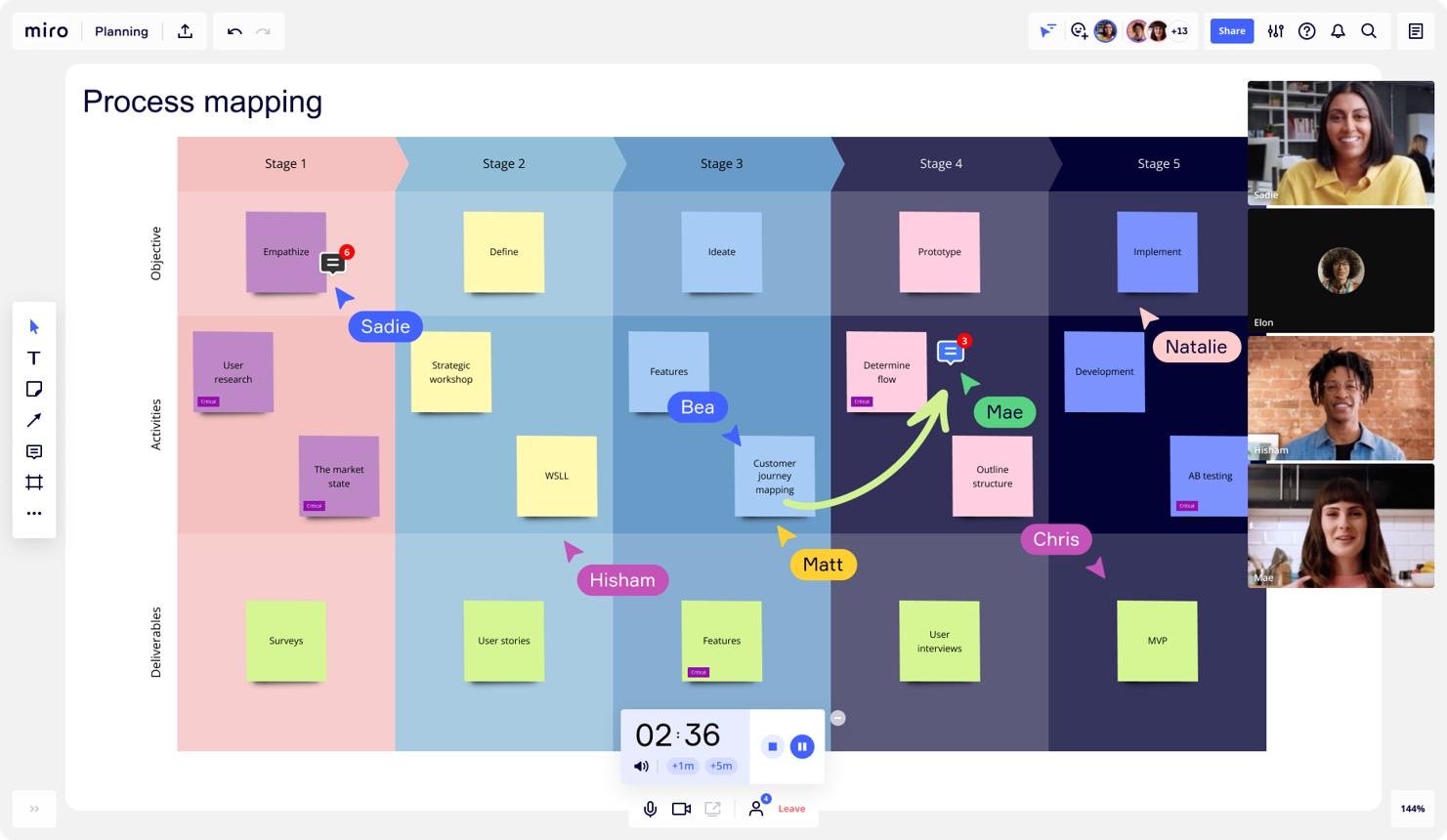
The online whiteboard is Miro’s main feature. It allows users to add text, sticky notes, images, shapes, diagrams, and other elements to a shared workspace.
Multiple people can work on the same board, making it easier to brainstorm and organize ideas.
Explore Miro’s Online Whiteboard
2. AI-Powered Tools
Miro includes AI-powered tools that help users generate ideas, summarize information, organize content, and create diagrams.
Its AI capabilities can help teams save time and turn unorganized information into structured content.
3. Ready-Made Templates
Miro provides thousands of templates for different projects and activities.
Some popular template categories include:
- Brainstorming sessions
- Mind maps
- Project planning
- Business strategy
- Customer journey mapping
- Agile workflows
- Product development
- Team meetings
These templates make it easier to get started without creating everything from scratch.
4. Real-Time Collaboration
Miro allows multiple users to collaborate on the same board in real time.
Team members can share ideas, add comments, edit content, and discuss projects together.
This is particularly helpful for remote teams that cannot meet in the same physical location.
5. Integrations
Miro connects with various productivity applications, including Slack, Microsoft Teams, Google Drive, Jira, and other workplace tools.
These integrations help users connect their existing workflows and manage information more efficiently.
6. Project Management Tools
Miro also offers features that support project planning and organization.
Users can create Kanban boards, timelines, tables, and workflows to organize tasks and monitor project progress.
Miro Pricing in 2026
Miro offers different subscription plans depending on the user’s needs.
Here is an overview of its main pricing options based on its published US annual-billing prices.
| Plan | Price | Main Features |
| Free | $0 | 3 editable boards and basic tools |
| Starter | $8/member/month | Unlimited boards and additional features |
| Business | $20/member/month | Advanced collaboration and AI capabilities |
| Enterprise | Custom pricing | Advanced security and administration |
Prices may vary depending on billing arrangements and location.
Is Miro Free?
Yes. Miro offers a free plan for individuals and teams who want to explore its basic features.
The free plan includes three editable boards, templates, collaboration tools, and limited AI capabilities.
Users who need unlimited editable boards, private workspaces, and additional features can consider upgrading to a paid subscription.
Pros and Cons of Miro
Before choosing any online collaboration tool, it is important to understand its advantages and disadvantages.
Pros
- Easy-to-use visual collaboration platform.
- Supports real-time teamwork.
- Offers thousands of ready-made templates.
- Includes AI-powered productivity features.
- Supports integrations with popular applications.
- Provides useful project planning tools.
- Offers a free plan.
Cons
- Some advanced features require a paid subscription.
- Large boards can become difficult to organize.
- Beginners may need time to understand all the tools.
- AI features have usage limits depending on the plan.
- Some features may be unnecessary for individual users.
Who Should Use Miro?
Miro is suitable for different types of users.
Students and Educators
Students can use Miro to organize research, create mind maps, and work on group assignments. Teachers can use it for interactive lessons and classroom activities.
Project Managers
Project managers can use Miro to organize tasks, create timelines, and plan project workflows.
Designers
Designers can use the platform to brainstorm ideas, create customer journey maps, and collaborate on design projects.
Remote Teams
Remote teams can use Miro to communicate, share ideas, and work together from different locations.
Business Professionals
Businesses can use Miro for strategic planning, workshops, product development, and team discussions.
Miro vs. Traditional Whiteboards
Traditional whiteboards are useful for in-person meetings, but they have limitations when people work remotely.
Miro provides a digital alternative with additional collaboration features.
| Feature | Miro | Traditional Whiteboard |
| Remote collaboration | Yes | No |
| Real-time editing | Yes | No |
| Digital templates | Yes | No |
| Cloud-based access | Yes | No |
| AI-powered tools | Yes | No |
| Easy content sharing | Yes | Limited |
For teams that depend on remote collaboration, Miro provides more flexibility than a traditional whiteboard.
Is Miro Worth It in 2026?
Yes, Miro is worth considering in 2026, particularly for teams that need visual collaboration and organized brainstorming.
Its combination of digital whiteboards, templates, AI capabilities, integrations, and project planning tools makes it a useful platform for modern workplaces.
The free plan is a good starting point for beginners, while paid plans offer additional features for growing teams and organizations.
However, Miro may not be necessary for people who only need basic note-taking or simple task management.
If you want to explore its features, you can visit Miro below.
Try Miro and Explore Its Features
Final Verdict: Miro Review 2026
Overall, Miro is a powerful visual collaboration platform that helps individuals and teams turn ideas into organized projects.
Its interactive whiteboard, extensive template library, AI-powered capabilities, and real-time collaboration features make it a strong option for remote teamwork.
Although some advanced features require paid subscriptions, the free plan gives beginners an opportunity to explore the platform.
Our verdict: Miro is a worthwhile collaboration tool in 2026 for students, designers, project managers, and businesses that need an effective way to brainstorm, plan, and work together.
If you are interested in improving your online collaboration experience, take a look at Miro and explore what it offers.