


A marketing dashboard is a single-pane view that pulls data from your channels into one place so you can spot where to act in about 10 seconds. Build one when a stakeholder keeps asking for numbers you’re still copying into slides by hand, or when decisions are getting made on stale data because nobody has a live view of what’s working.
TL;DR:
- Most dashboards should focus on 7 to 9 key visualizations to ensure rapid understanding and prevent metric overload.
- Role-specific dashboards with aligned KPIs and filters improve relevance and user engagement across different marketing functions.
- Regular data refreshes, clear ownership, and streamlined governance help sustain dashboard relevance and usage over time.
- Use consistent, plain language for metrics, add visible last-updated timestamps, and remove outdated widgets to keep dashboards current and useful.
- Building dashboards from stakeholder questions and business objectives, rather than jumping directly to tools, increases their effectiveness and adoption.
Table of Contents
- What Types of Marketing Dashboards Should You Build?
- Which KPIs Actually Belong on a Marketing Dashboard?
- What Do Ready-to-Use Dashboard Templates Look Like?
- How Do You Build a Marketing Dashboard From Scratch?
- Why Do Marketing Dashboards Stop Getting Used?
- What Practical Tactics Keep Dashboards From Going Stale?
- How Do You Protect Marketing Data When Building Dashboards?
- How Should You Customize a Dashboard for Different Departments?
- How Do You Read and Interpret What a Dashboard Is Telling You?
- When Should You Bring In Help Versus Build It Yourself?
- Sources
What Types of Marketing Dashboards Should You Build?
Not every stakeholder needs the same dashboard, and building one universal view for everyone is how most dashboards end up ignored. The fix is matching the dashboard to the question the viewer actually asks when they open it.
Here’s how the main types break down by audience, cadence, and the single question each one answers:
- CMO/executive dashboard. Audience is leadership. The 10 second question: “Are we hitting revenue and pipeline targets this quarter?” Updated weekly or monthly, usually several widgets covering pipeline contribution, marketing sourced revenue, customer acquisition cost, and channel mix. Layout example: top row shows revenue and pipeline trend lines, bottom row breaks out spend by channel against target.
- Digital marketing dashboard. Audience is the marketing manager overseeing all digital channels. Question: “Which channel needs my attention today?” Updated daily, 8 to 10 widgets spanning traffic, conversion rate, cost per lead, and channel comparison. Layout: a scorecard row up top, a multi-channel trend chart below.
- SEO dashboard. Audience is the SEO lead or content team. Question: “Are we gaining or losing organic visibility?” Updated weekly, several widgets covering organic sessions, keyword rankings, backlinks, crawl errors, and top landing pages. Layout: rankings table on the left, traffic trend on the right.
- Paid media dashboard. Audience is the paid media buyer. Question: “Which campaigns are burning budget without returns?” Updated daily, 8 to 10 widgets: spend, ROAS, CPC, CPA, and impression share by platform. Layout: a spend versus return scatter at the top, campaign-level table below.
- Social media dashboard. Audience is the social manager. Question: “What content is driving engagement this week?” Updated daily or weekly, several widgets covering engagement rate, follower growth, top posts, and share of voice. Layout: platform tabs with a top-post carousel.
- Email marketing dashboard. Audience is the lifecycle or CRM marketer. Question: “Which campaigns are converting versus just getting opened?” Updated weekly, several widgets covering open rate, click rate, unsubscribe rate, and revenue per send. Layout: a funnel chart from sent to converted.
- Attribution dashboard. Audience is the analytics or growth team. Question: “Which touchpoints actually influence conversion?” Updated weekly or monthly, several widgets focusing on multi-touch attribution models, assisted conversions, and channel overlap. Layout: a Sankey or path chart plus a model comparison table.
- Campaign dashboard. Audience is the campaign manager running a specific launch. Question: “Is this campaign pacing to goal?” Updated daily during the campaign window, several widgets tied to that campaign’s specific KPIs. Layout: a pacing chart against a target line.
Example galleries built around platforms like Tableau and channel-specific tools such as Coupler.io’s marketing dashboard collection are worth browsing before you build anything. Borrowing a proven layout beats designing from a blank canvas.
Which KPIs Actually Belong on a Marketing Dashboard?
The mistake most teams make is treating every metric as equally important, which produces a dashboard nobody can read at a glance. The fix is a tiered KPI model that separates strategic numbers from the tactical ones underneath them.
Strategic tier (executive view): revenue contribution, customer acquisition cost, marketing-sourced pipeline, and return on marketing investment. These are the numbers a CMO cares about because they tie marketing to business outcomes.
Operational tier (channel manager view): conversion rate by channel, cost per lead, traffic by source, and email or social engagement rates. These sit one level down and explain why the strategic numbers moved.
Tactical tier (specialist view): click through rate on individual ads, keyword position changes, bounce rate on specific landing pages, A/B test results. These are the diagnostic numbers a specialist uses day to day.
A few rules for picking metrics at any tier:
- Every metric on the dashboard should tie to a stated objective. If you can’t name the decision it informs, cut it.
- Prioritize metrics the viewer can act on. Impressions look impressive but rarely change what anyone does next.
- Run a data quality check before launch: confirm sessions aren’t being confused with users, and that “conversions” means the same thing across every data source feeding the dashboard.
Pro Tip: Revenue attribution is the single most common source of dashboard distrust. If your paid, email, and CRM data use three different attribution windows, your numbers will never reconcile, and stakeholders will quietly stop trusting the dashboard. Standardize the attribution model before you standardize anything else.
Dashboards built for monitoring behave differently than static reports. A Monday points out that dashboards need to support filtering and drilldowns for in-the-moment decisions, while reports are built for retrospective analysis. If your “dashboard” can’t be filtered by date range or segment, it’s actually a report wearing a dashboard’s name.
What Do Ready-to-Use Dashboard Templates Look Like?
Three templates cover most of what marketing teams actually need. Each one below lists the widgets, filters, and the audience it’s built for.
- CMO executive template. Widgets: revenue trend, pipeline by stage, CAC by channel, marketing ROI, top three campaigns by contribution. Filters: quarter selector, business unit toggle. Best for board updates and monthly leadership reviews.
- Paid media ops template. Widgets: spend versus budget pacing, ROAS by platform, CPA trend, top and bottom performing campaigns, impression share. Filters: platform selector, date range, campaign status. Best for daily standups and weekly optimization sessions.
- SEO/content owner template. Widgets: organic traffic trend, keyword ranking distribution, top gaining and losing pages, backlink growth, content publishing cadence. Filters: device type, landing page segment. Best for monthly content planning and quarterly SEO reviews.
A few layout rules apply across all three. Cap each view at 7 to 9 visualizations, matching the 10-second test threshold Zoho Analytics recommends for how fast a viewer should be able to extract the key insight. Put filters in a consistent spot, usually top left, so returning users don’t hunt for them. Use color sparingly and consistently: one color for “on target,” one for “at risk,” and stop there. Rainbow dashboards look busy and communicate nothing.
Pro Tip: When adapting a template to a different business model, don’t just swap metric names. A subscription business needs churn and MRR front and center; a one-time-purchase ecommerce brand needs average order value and repeat purchase rate instead. The layout can stay identical, but the KPI substitutions have to reflect how the business actually makes money.
How Do You Build a Marketing Dashboard From Scratch?
Skipping straight to connectors and charts is the fastest way to build a dashboard nobody opens twice. The right sequence starts with people, not data.
- Map your stakeholders and their 10-second question. Before touching any tool, write down who will look at this dashboard and the single decision they need it to inform. A CMO’s question is different from a paid media buyer’s, and one dashboard rarely serves both well.
- Set objectives tied to business outcomes. Every dashboard should trace back to a goal like “increase qualified pipeline” or “cut cost per acquisition,” not a vague ambition to “track marketing.”
- Inventory your data sources. List every platform holding relevant data: your analytics tool, ad platforms, email service, CRM, social accounts. Note what’s connectable via native integration versus what requires manual export.
- Choose visualizations that match the question. Trends over time call for line charts. Comparisons across channels call for bar charts or tables. Distributions call for scorecards. Don’t default to pie charts for anything with more than three segments.
- Run a pre-launch QA pass. Check that metric names are consistent across widgets, that percentage denominators are clearly labeled, and that refresh schedules match how often the audience actually checks the dashboard.
- Pilot with a small group before rolling out widely. Guides on building dashboards consistently recommend mapping stakeholder questions to metrics first, then wiring the data, and testing with a narrow audience before scaling.
A practical connector checklist for step three:
- Web analytics platform (GA4 or equivalent) for traffic and conversion data
- Search Console for organic visibility metrics
- Ad platform APIs (Google Ads, Meta, LinkedIn) for spend and performance data
- Email service provider for send, open, and click data
- CRM for pipeline and revenue attribution
After launch, set a feedback loop: check usage logs monthly, ask the pilot group directly whether they still open it, and set a maintenance cadence (usually monthly) to review whether the KPIs still match current objectives. Dashboards that skip this step quietly rot even when the data feed keeps running.
Why Do Marketing Dashboards Stop Getting Used?
Most dashboard failures trace back to five repeatable patterns, and each one has a specific fix.
- Metric overload. Too many widgets competing for attention. Fix: cap at 7 to 9 visualizations and cut anything that doesn’t inform a named decision.
- Vanity metrics dominating the view. Impressions and follower counts feel good but rarely drive action. Fix: replace with conversion-adjacent metrics like cost per acquisition or engagement-to-conversion rate.
- Stale data nobody notices. A dashboard that stopped refreshing three weeks ago still looks fine until someone checks the timestamp. Fix: display last-refreshed time visibly on every dashboard, and alert an owner when a sync fails.
- No named owner. Dashboards without an accountable owner drift into irrelevance as business priorities shift. Fix: assign one person per dashboard responsible for quarterly relevance reviews.
- Mismatched audience and content. Building one dashboard to serve both executives and specialists satisfies neither. Fix: split into role-specific views, even if it means maintaining more dashboards, not fewer.
Improvado’s research into dashboard adoption found that the core failure mode isn’t bad data, it’s stakeholders never opening the thing at all. Their recommendation, and a good governance rule generally, is to limit an organization to 2 or 3 active dashboards chosen by decision context rather than letting every team spin up its own.
A quick health scorecard helps catch decay before it becomes total abandonment:
| Health signal | Warning threshold | Action |
|---|---|---|
| Login/view frequency | Not recently opened by intended audience | Interview the stakeholder or retire it |
| Data recency | Last refresh older than expected cadence | Check connector or pipeline for failures |
| Metric relevance | KPIs no longer tied to a current objective | Revise widgets at next quarterly review |
| Owner accountability | No named owner for 30+ days | Reassign ownership immediately |
Governance doesn’t need to be heavy. One owner per dashboard, one quarterly review meeting, and a clear retirement rule (unused for two consecutive review cycles gets archived) keeps the dashboard count from creeping upward indefinitely.
What Practical Tactics Keep Dashboards From Going Stale?
Working with growth-focused businesses on lead generation and visibility, a pattern shows up repeatedly: dashboards fail less from bad tooling and more from being built for the builder’s convenience instead of the viewer’s question. The checklist below reflects the lowest-effort, highest-impact changes worth making first.
- Rename every metric to plain language a non-marketer would understand (“cost per lead” instead of “CPL”) before launch.
- Add a visible “last updated” timestamp to every dashboard, no exceptions.
- Cut any widget that hasn’t informed a decision in the last 30 days.
- Assign one owner per dashboard by name, not by team.
- Pilot with the smallest possible audience before rolling a dashboard out company-wide.
Pro Tip: If you’re inheriting a dashboard someone else built, resist the urge to redesign it immediately. Watch how the current audience actually uses it for two weeks first. Half the “fixes” people plan turn out to be features someone else relies on.
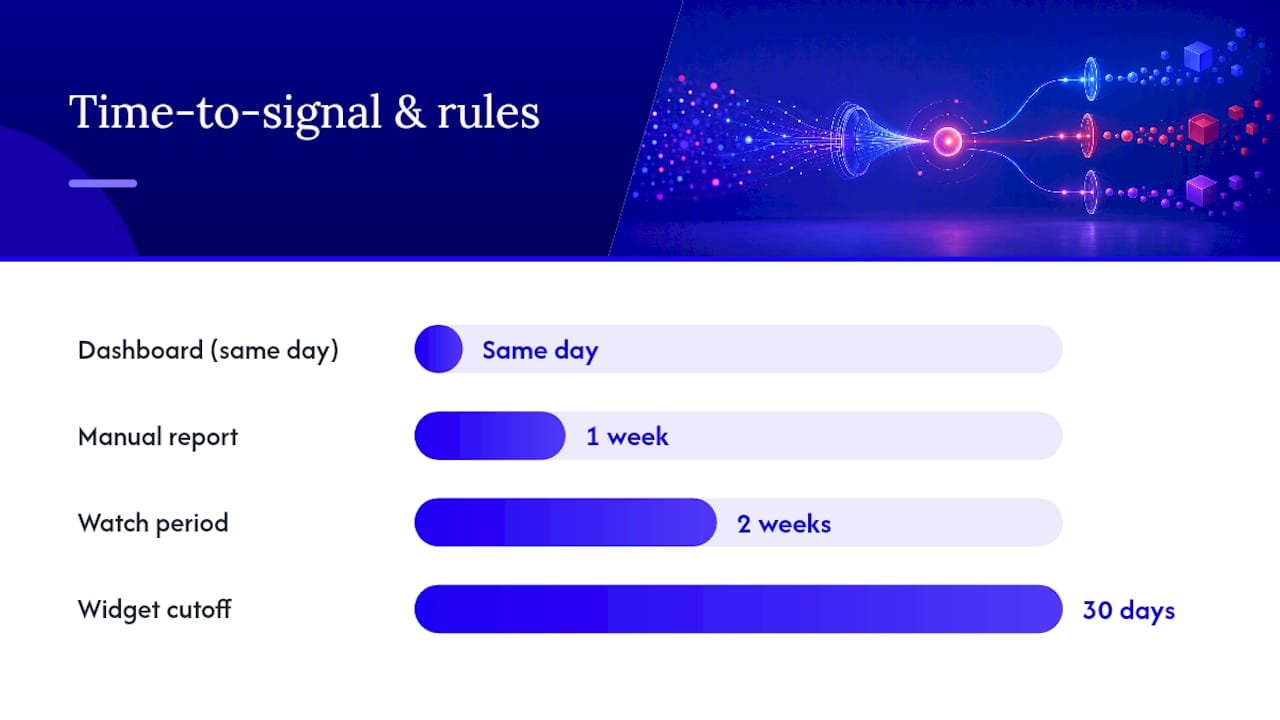
Picture a mid-size B2B team that consolidates five spreadsheets into one paid media dashboard with clear ROAS thresholds by channel. The likely result: faster reallocation of budget away from underperforming campaigns, because the signal that used to take a week to surface in a manual report now shows up the same day. Picture a content team that swaps a vanity-metrics dashboard (pageviews, social shares) for one built around organic conversion rate and assisted revenue. The likely shift: content planning starts prioritizing pages that convert over pages that simply rank, changing what gets written next quarter.
How Do You Protect Marketing Data When Building Dashboards?
Marketing dashboards often pull from CRM systems, ad platforms, and email tools simultaneously, which means they can expose customer-level data (names, emails, purchase history) far beyond the marketing team if access isn’t controlled.
Set role-based access before you set anything else. Not every viewer needs the same data granularity. An executive dashboard can show aggregate revenue figures without ever surfacing individual customer records, while a CRM-integrated operational dashboard might need row-level detail restricted to the sales team.
Watch for a few specific risks. Exported dashboard data (PDFs, screenshots, shared links) often lives outside your normal access controls once it leaves the platform, so treat sharing settings as seriously as the source data itself. If your dashboard blends data across regions, be aware that customer data may fall under different privacy regulations depending on where that customer is located, and dashboards that combine EU and non-EU customer data can trigger different handling requirements. Confirm with legal or compliance which rules apply to your specific data before building cross-region views.
Practical habits worth adopting: anonymize or aggregate personally identifiable information wherever the dashboard’s purpose doesn’t require individual-level detail, audit who has access to shared dashboard links quarterly, and avoid embedding raw CRM exports directly into a dashboard when a pre-aggregated data source will do the same job with less exposure.
How Should You Customize a Dashboard for Different Departments?
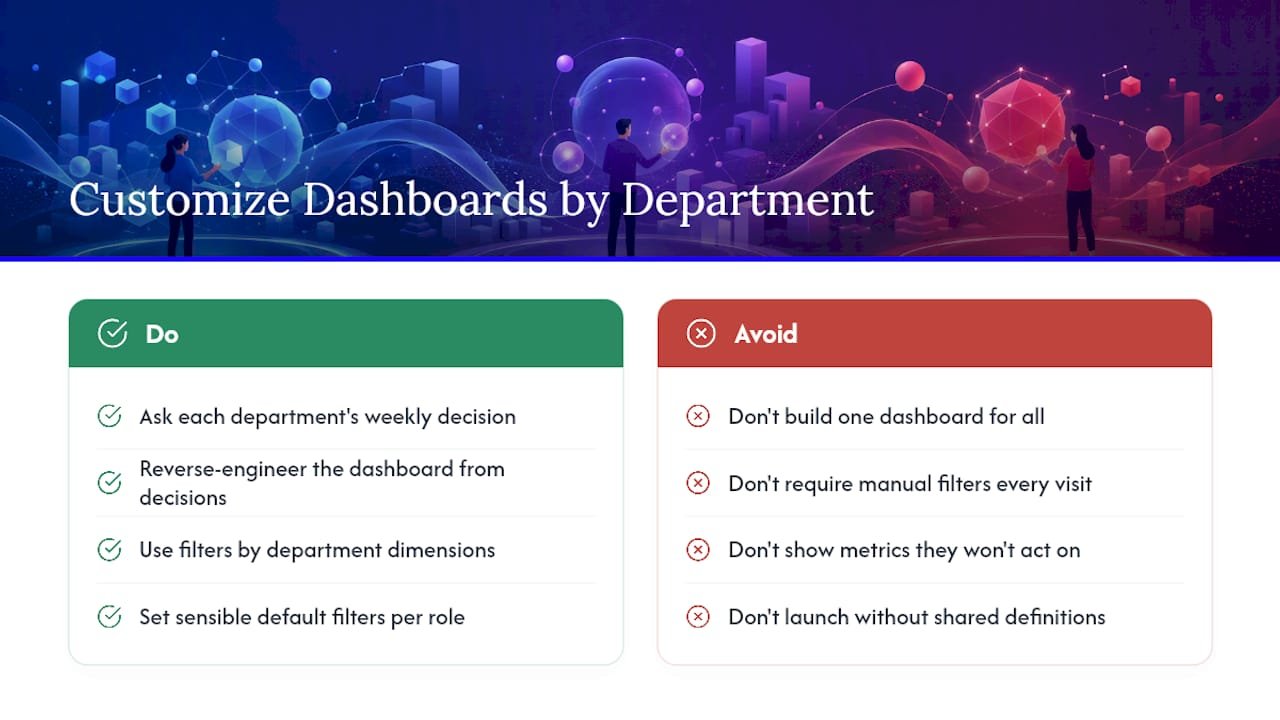
The same underlying data can serve five different departments if you resist the urge to build one dashboard that tries to satisfy everyone at once.
Start by asking what decision each department makes weekly, then reverse-engineer the dashboard from that decision. Sales leadership cares about pipeline contribution and lead quality by source; give them a view filtered to marketing-sourced opportunities with a clear handoff-to-close rate. Product marketing cares about feature adoption and campaign-driven usage; their dashboard should tie campaign activity to in-product behavior, which most general marketing dashboards omit entirely. Finance cares about spend efficiency and forecast accuracy; a dashboard for them should emphasize budget pacing and cost-per-outcome trends over engagement metrics they’ll never act on.
Filter design does most of the customization work without requiring separate builds. A single underlying data set can power a regional sales view, a product-line view, and a channel view if your filters are built around the dimensions each department actually segments by. Set sensible defaults, though. A regional sales director shouldn’t have to manually filter to their region every time they open the dashboard.
Naming conventions matter more across departments than within one team. Marketing’s definition of a “qualified lead” often differs from sales’, and a shared dashboard that doesn’t reconcile that difference will generate disputes instead of alignment. Get departments to agree on shared definitions before the dashboard launches, not after someone questions a number in a meeting.
How Do You Read and Interpret What a Dashboard Is Telling You?
A number on a dashboard means nothing without context, and the most common misread is treating a single data point as the whole story instead of checking the trend behind it.
Start every read with the trend line, not the current value. A conversion rate of 2.3% tells you almost nothing on its own; a conversion rate that’s climbed from 1.8% to 2.3% over six weeks tells you something is working. Compare against a baseline, whether that’s last period, last year, or a stated target, because raw numbers without a comparison point invite guessing.
Watch for correlation traps. A spike in social engagement the same week revenue rose doesn’t mean social drove the revenue. Check whether other variables moved at the same time (a product launch, a pricing change, a seasonal pattern) before attributing cause. Attribution dashboards help here, but even multi-touch models have blind spots around offline influence and word of mouth.
Segment before you conclude. An overall conversion rate that looks flat can be hiding a channel that’s improving and another that’s declining, canceling each other out in the aggregate view. Drilling into segments is often where the actual insight lives, which is exactly why static reports fall short of interactive dashboards for this kind of analysis.
Finally, treat outliers as questions, not answers. A sudden 40% jump in traffic is more likely a tracking error or a bot spike than genuine growth. Confirm against a second data source before acting on any number that looks too good.
When Should You Bring In Help Versus Build It Yourself?
Templates and internal ops work fine when your data sources are simple and someone on the team has the bandwidth to own the build. Bring in outside help when you’re blending six or more sources, when attribution disputes are stalling decisions, or when nobody internally has time to own the quarterly upkeep a good dashboard actually requires.
Marketing work that leverages partnerships and AI-assisted analytics can help shorten that timeline, mainly by automating connector setup and flagging metric anomalies before they reach a stakeholder’s screen. That’s the gap between a dashboard that works for a month and one that stays trusted for years.
Three steps to start this week: name your top three stakeholder questions, audit which data sources already answer them, and pilot one dashboard before building a second.
Sources
Three broad approaches exist, and the right one depends on your data complexity and team size.
Spreadsheets plus connectors work fine for small teams with two or three data sources and simple reporting needs. They’re cheap and flexible but break down fast once you’re blending five or more channels, since manual refresh cycles introduce lag and human error.
BI platforms (like Tableau or similar analytics tools) handle complex blending and offer stronger visualization control, at the cost of a steeper setup curve and often a licensing cost per seat.
Integrated marketing platforms bundle dashboarding with native connectors to common marketing tools, which shortens time-to-value. Vendor documentation on platforms like Zoho’s marketing analytics tools points to pre-built templates and native integrations as the main reason teams choose an integrated approach over building from scratch.
At minimum, your connector set should cover:
- What is Marketing Dashboard? Guide with Examples – Zoho Analytics
- 12 Best Marketing Dashboard Examples & Templates for 2026 – Improvado
- Monday
- 26 Marketing Dashboards To Track Your Progress | Coupler.io Blog
- What Is a Marketing Dashboard? Guide and Examples – Wrike
Sync cadence matters as much as the connection itself. Daily syncs suit paid media and social dashboards where decisions happen fast; weekly syncs are fine for SEO and content dashboards where change is slower. Whatever you choose, blend channel data with CRM or revenue data wherever possible. Marketing metrics divorced from revenue outcomes tell you activity happened, not whether it worked. Store canonical metric definitions (what counts as a “conversion,” what date range “this month” means) in one shared place so every dashboard pulls from the same definition instead of silently drifting apart.